

How to create context panels with Visual Studio?
The PRIMAVERA ERP's extensibility technology allows you to create context panels where developers can totally control the content and presentation. Unlike related information panels, which are necessarily linked to an information category and can only be called from that category, context panels can be called anywhere and at any time using code. For example, you can build a dashboard that uses a web service to display the exchange rate of several currencies against the euro and display it as soon as you open the ERP. Context panels are created based on forms, which means that all you need to do is add a form with the content you wish to display to the applicable extension and call the panel using the api PSO.DockingManager() .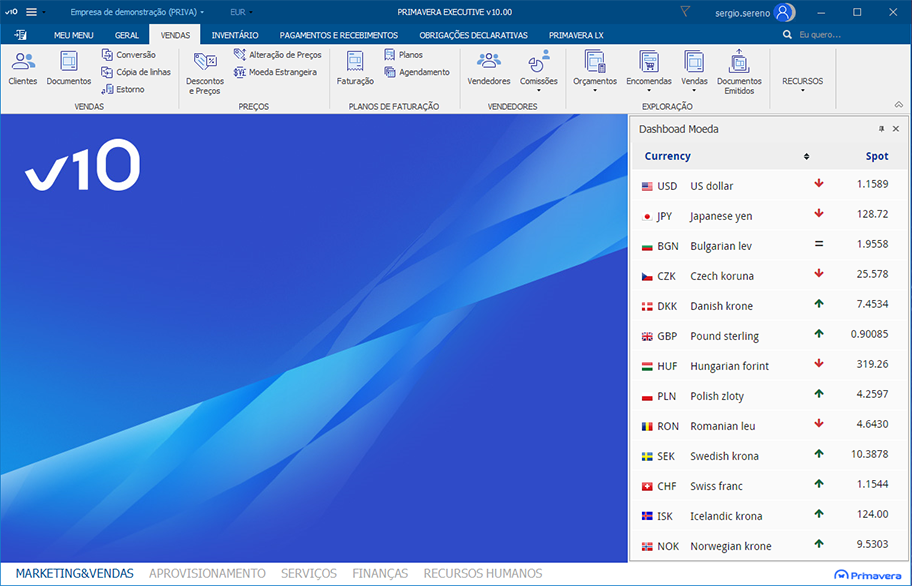
using Primavera.Extensibility.BusinessEntities.ExtensibilityService.EventArgs;
using Primavera.Extensibility.Platform.Services;

namespace Primavera.PainelContexto
{
    public class DashboardCambios:Plataforma
    {
        public override void DepoisDeAbrirEmpresa(ExtensibilityEventArgs e)
        {
            // Form with the exrate service.
            UIDashboardCambios dashboard = new UIDashboardCambios ();

            if (PSO.DockingManager.Existe('ID_DashboadMoeda'))
            {
                dashboard.UpdateCurrencies();
                PSO.DockingManager.ActualizaPainel('ID_DashboadMoeda', dashboard);
            }
            else
            {
                dashboard.LoadCurrencies();
                PSO.DockingManager.AbrePainel(StdBE100.StdBETipos.DockingEstilo.estiloDireita,
                                                300,
                                                0,
                                                'ID_DashboadMoeda',
                                                'Dashboad Moeda',
                                                ',
                                                dashboard);
            }
        }
    }
}