
Formulas in Queries
Vision allows you to obtain new columns of data as a result of the definition of formulas, by using a simple syntax or language. Each formula has a type associated with it, which does not need to be defined: Vision determines it automatically according to what the grammar indicates. Formulas can be added in two ways: In the formula editor there is a space where the formula expression is written. The user can type it directly if he/she knows the language and wishes to do so, but to facilitate the task the editor has some useful resources: Example of the formula editor The Functions tab contains all operations and calculations that can be performed in the formula dialog. There are several categories, depending on the input/output of the function, each with its associated block in the function list: Categories Formula editor showing function classes Note: In case of using text strings with special characters, such as Add Formulas
In the query associated to a widget in an app, by including them in a Select block.$SQ_subqueryName_columnName__N"".$FILTER_columnName__N"".$shifterName"".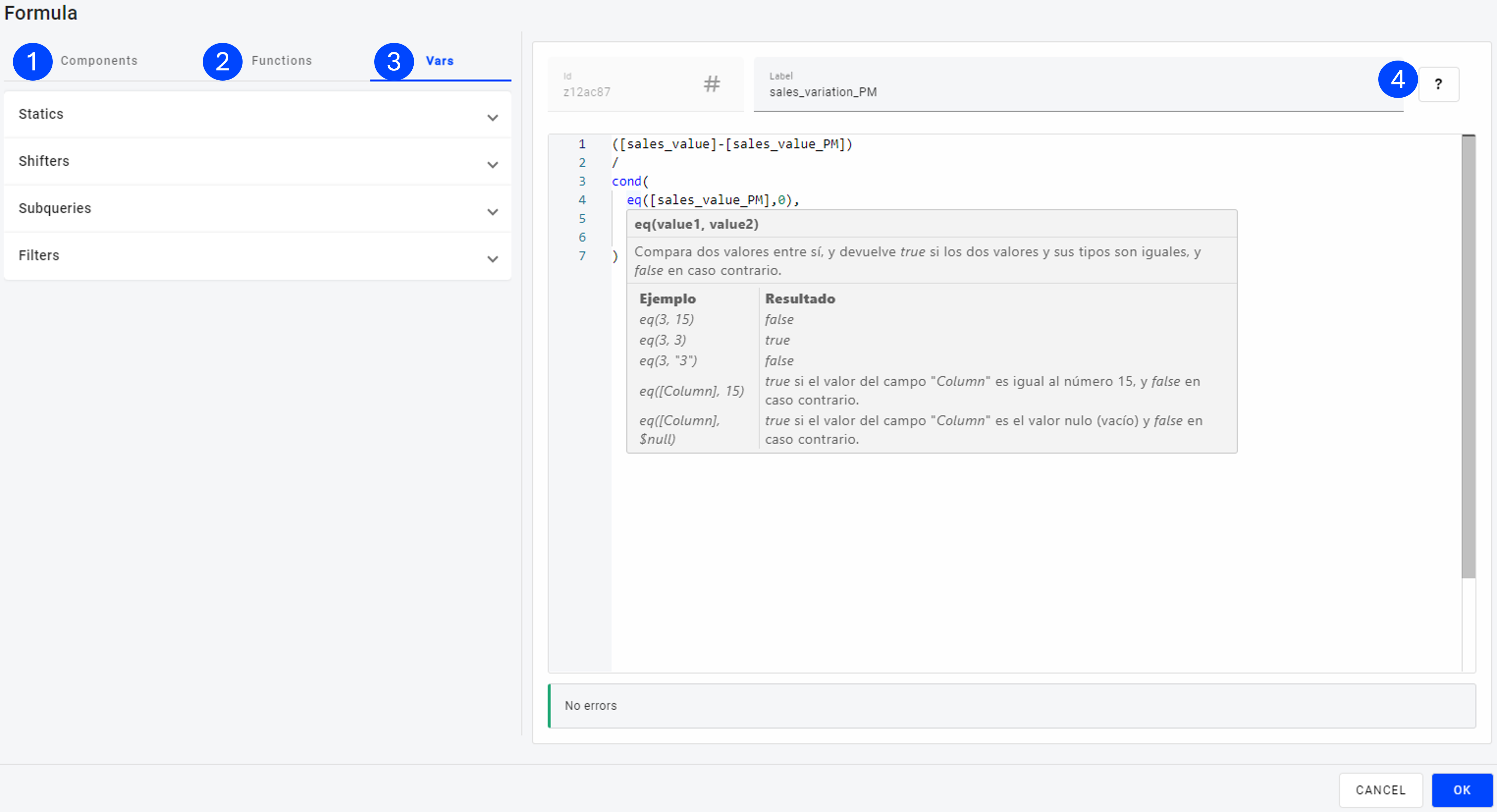
Use Functions
Arrays Comparison Conditionals Conversion Dates Logics Mathematics Operators Text Trigonometric 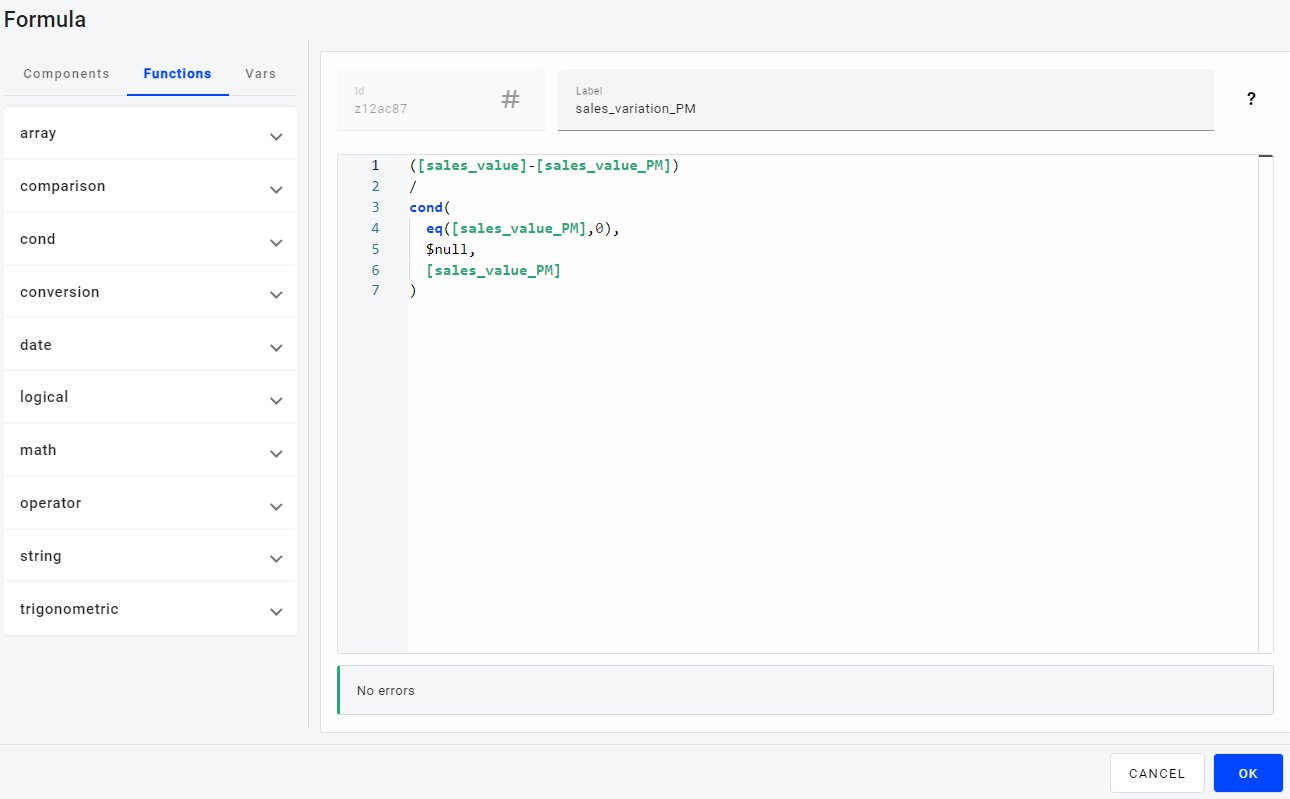
"",+,% or others, as function arguments, they must be preceded by the backslash \ so that they are interpreted as part of the text string and not as special symbols.
Arrays
These functions are special in that they handle arrays or ordered sets of data as arguments. They are mainly used to handle the results of subqueries or lists of filter values.
| Contains the value | Array element | Value position | Array size |
| contains(A, v) | elementAt(A, i) | indexOfArray(A, v) | size(A) |
Contains the value
Syntax: contains(Array, value)
Checks if value is contained in the set of elements in Array form, as for example happens with the result of a subquery. Returns true if the expression is part of the array or false otherwise.
Example:
| EXAMPLE | Result |
|---|---|
| contains([""a"", ""b"", ""c""], ""a"") | true |
| contains([""a"", ""b"", ""c""], ""d"") | false |
| contains($SQ_Field_Var, [Column]) | Returns true if the value of the Column field belongs to the set of values of the Field field returned by the SQ subquery, and false otherwise. |
Array element
Syntax: elementAt(Array, index)
Returns the value or element of the array located at the ""index"" position. Note that an array of N elements has indexes from 0 to N-1, if the index is greater than N-1 it is returned empty.
Example:
| EXAMPLE | Result |
|---|---|
| elementAt([""a"", ""b"", ""c""], 0) | a |
| elementAt([""a"", ""b"", ""c""], 2) | c |
| elementAt([""a"", ""b"", ""c""], 3) | |
| elementAt($SQ_Field_Var, [Column]) | Returns the element with index equal to the value of the numeric field Column from the set of values of the field Field returned by the subquery SQ. |
Value position
Syntax: indexOfArray(Array, value)
Checks if value is contained in the set of elements in Array form, as for example happens with the result of a subquery. Returns the number equal to the index of the element equal to value if the expression is part of the array or -1 otherwise. Note that an array of N elements has indexes from 0 to N-1.
Example:
| EXAMPLE | Result |
|---|---|
| indexOfArray([""a"", ""b"", ""c""], ""a"") | 0 |
| indexOfArray([""a"", ""b"", ""c""], ""c"") | 2 |
| indexOfArray([""a"", ""b"", ""c""], ""d"") | -1 |
| indexOfArray($SQ_Field_Var, [Column]) | Returns the index of the Column field value if it belongs to the set of Field field values returned by the SQ subquery, and -1 otherwise. |
Array size
Syntax: size(Array)
Returns a numeric value equal to the number of elements or size of the Array. All elements in the array must be of the same type.
Examples:
| Example | Result |
|---|---|
| size(["a", "b"]) | 2 |
| size([15,29,33]) | 3 |
| size([]) | 0 |
Comparison (equality)
Functions
| Comparison | Equal | Not equal |
| cmp(v1,v2) | eq(v1,v2) | ne(v1,v2) |
Comparison
Syntax: cmp(value1, value2)
Compares the type and value of the two arguments:
- If the types are equal it returns 1 if the first value is greater than the second, -1 if less and 0 if they are equal.
- If the types are different, it follows the order criteria from lowest to highest: null, number, text, array, boolean (true, false) and date.
| EXAMPLE | Result |
|---|---|
| cmp(1, ""a"") | -1 |
| cmp(1, 1) | 0 |
| cmp(1, 2) | -1 |
| cmp(2, 1) | 1 |
| cmp(""a"", ""b"") | -1 |
| cmp(false, 1) | 1 |
| cmp(1, $null) | 1 |
Equal
Syntax: eq(value1, value2)
Compares two values against each other, and returns true if the two values and their types are equal, and false otherwise.
Example:
| EXAMPLE | Result |
|---|---|
| eq(3, 15) | false |
| eq(3, 3) | true |
| eq(3, ""3"") | false |
| eq([Column], 15) | true if the value of the Column field is equal to the number 15, and false otherwise. |
| eq([Column], $null) | true if the value of the Column field is null (empty) and false otherwise. |
Not equal
Syntax: ne(value1, value2)
Compares two values against each other, and returns true if the two values or their types are different, and false otherwise.
Example:
| EXAMPLE | Result |
|---|---|
| ne(3, 15) | true |
| ne(3, 3) | false |
| ne(3, ""3"") | true |
| ne([Column], 15) | false if the value of the Column field is equal to the number 15, and true otherwise. |
| ne([Column], $null) | false if the value of the Column field is null (empty) and true otherwise. |
Comparison (greater/lower)
Greater or equal
Syntax: gte(value1, value2)
Compares two values against each other, and returns true if the first value is greater than or equal to the second and their types are equal, and false otherwise.
Examples
| EXAMPLE | Result |
|---|---|
| gte(3, 15) | false |
| gte(3, 3) | true |
| gte(15, 3) | true |
| gte(""a"", ""b"") | false |
| gte([Column], 15) | true if the value of the Column field is greater than or equal to 15 and false otherwise. |
| gte(0, $null) | true, the order criteria between types is from lowest to highest: null, number, text, array, boolean (true, false) and date. |
Greater
Syntax: gt(value1, value2)
Compares two values against each other, and returns true if the first value is greater than the second and their types are equal, and false otherwise.
Examples:
| EXAMPLE | Result |
|---|---|
| gt(3, 15) | false |
| gt(3, 3) | false |
| gt(15, 3) | true |
| gt(""a"", ""b"") | false |
| gt([Column], 15) | true if the value of the Column field is greater than 15 and false otherwise. |
| gt(0, $null) | true, the order criteria between types is from lowest to highest: null, number, text, array, boolean (true, false) and date. |
Lower or equal
Syntax: lte(value1, value2)
Compares two values with each other, and returns true if the first value is less than or equal to the second and their types are equal, and false otherwise..
Examples:
| EXAMPLE | Result |
|---|---|
| lte(3, 15) | true |
| lte(3, 3) | true |
| lte(15, 3) | false |
| lte(""a"", ""b"") | true |
| lte([Column], 15) | true if the value of the Column field is less than or equal to 15 and false otherwise. |
| lte(0, $null) | false, the order criteria between types is from lowest to highest: null, number, text, array, boolean (true, false) and date. |
Lower
Syntax: lt(value1, value2)
Compares two values against each other, and returns true if the first value is less than the second and their types are equal, and false otherwise.
Examples:
| EXAMPLE | Result |
|---|---|
| lt(3, 15) | true |
| lt(3, 3) | false |
| lt(15, 3) | false |
| lt(""a"", ""b"") | true |
| lt([Column], 15) | true if the value of the Column field is less than 15 and false otherwise. |
| lt(0, $null) | false, the order criteria between types is from lowest to highest: null, number, text, array, boolean (true, false) and date. |
Conditionals
Conditional functions, which are very frequently used, allow you to change the conditions for the transformation of the original fields. They are the following:
| Simple conditional | Multiple conditional | If null |
| cond(b, v1, v2) | switch(b1, v1; b2, v2; ... ; v) | ifNull(v, r) |
Simple conditional
Syntax: cond(boolean, value1, value2)
The first argument is a boolean (true or false), for example the result of a comparison function. If boolean equals true the function returns value1, otherwise value2. In addition, value1 and value2 must necessarily have the same data type.
Examples:
| EXAMPLE | Result |
|---|---|
| cond(true, 1, 0) | 1 |
| cond(false, 1, 0) | 0 |
| cond(eq(1, ""1""), 1, 0) | 0 |
| cond(gt(5, 22), 1, 0)* | 1 |
| cond(gt([Reference], 100), [Column1], [Column2]) | Returns the value of the Column1 field if the value of the Reference column is greater than 100, and the value of the Column2 field otherwise. |
Multiple conditional
Syntax: switch(boolean1, value1; boolean2, value2; ...; value)
The function receives pairs of values (boolean, value) separated by "";"". If boolean1 is equal to true the function returns value1, otherwise it goes to the next pair; if boolean2 is equal to true the function returns value2, otherwise it goes to the next pair; this process is repeated as many times as pairs (boolean, value) are indicated; finally, if all boolean are false, value is returned. Particularities:
- At least 2 conditions must be defined, otherwise the simple conditional function must be used.
- The default value is not mandatory, a null value is returned if not defined.
Examples:
| EXAMPLE | Result |
|---|---|
| switch(true, 1; false, 2; 0) | 1 |
| switch(false, 1; false, 2) | null |
| switch(eq(1, ""a""), 1; eq(1, true), 2; eq(1, 1), 3; 0) | 3 |
| switch(eq(1, ""a""), 1; eq(1, true), 2; eq(1, 2), 3; 0) | 0 |
| switch(lt([Column], 5), ""lt""; gt([column], 5), ""gt""; ""eq"") | If the value of the numeric field Column is less than 5 it returns ""lt"", if greater ""gt"", and ""eq"" in all other cases. |
If null
Syntax: ifNull(value, replacement)
The ifNull function allows to replace the null values of a column by another value. If value has a null value, the function returns replacement, otherwise value. It is mandatory that replacement has the same data type as value.
Examples:
| EXAMPLE | Result |
|---|---|
| ifNull(0, 1) | 0 |
| ifNull($null, 1) | 1 |
| ifNull([Column], 0) | Returns 0 if the value of the numeric field Column is null, and otherwise the value of Column. |
Conversion
Conversion functions allow you to change the type of a field. This process is usually delicate, especially when there are decimals, punctuation marks or special formats. It is advisable to test and validate that everything works correctly when using these functions.
| Number to text | Text to number |
| toString(n) | toNumber(t) |
Number to text
Syntax: toString(number)
Converts the number value to text. Integers are returned without decimal places, and numbers with decimal places are returned with a maximum of 5 decimal places. In addition, from 10 integer digits onwards the number is formatted as an exponential.
Examples:
| EXAMPLE | Result |
|---|---|
| toString(1) | 1 |
| toString(3.1416) | 3.1416 |
| toString(3.1415926535) | 3.14159 |
| toString(123456789) | 123456789 |
| toString(12345678901) | 1.23457e+10 |
| toString([Column]) | Returns the numeric value of the Column field as text. |
Text to number
Syntax: toNumber(text)
Convert the string text to a number, whenever possible.
Examples:
| EXAMPLE | Result |
|---|---|
| toNumber(""1"") | 1.00 |
| toNumber(""3.1416"") | 3.1416 |
| toNumber(""3a"") | null |
| toNumber([Column]) | Returns, if possible, the numeric value of the Column text field, otherwise the null value. |
Dates (parts)
These functions allow you to create, transform or convert fields of a temporary nature.
Functions
| Year | Month | Name of the month | Day of the Month | Name of the day | Quarter |
| year(d[,b]) | month(d[,b]) | monthName(d[,l]) | day(d[,b]) | dayName(d[,l]) | quarter(d[,p]) |
Year
Syntax: year(date [, boolean])
The function extracts the year from the date value. If the boolean true is given as the second argument, the return of the function is numeric, while otherwise or when only the first argument is given, the return is of text type.
Examples:
| EXAMPLe | Result |
|---|---|
| year($now) | 20XY (text) |
| year($now, true) | 20XY.00 (number) |
| year(dateFromParts(2023,1,1)) | 2023 |
| year(dateFromParts(2024,1,1), true) | 2024.00 |
| year([Column]) | Year (text) associated to each date in the Column field. |
Month
Syntax: month(date [, boolean])
The function extracts the month from the date value. If the boolean true is given as the second argument the return of the function is numeric (1-12), while otherwise or when only the first argument is given the return is of text type (01-12).
Examples:
| EXAMPLe | Result |
|---|---|
| month(dateFromParts(2023,7,1)) | 07 |
| month(dateFromParts(2024,9,1), true) | 9.00 |
| month([Column]) | Month (01-12) associated to each date in the Column field. |
Name of the month
Syntax: monthName(date [, language])
The function extracts the month from the date value and returns the month name (""January"", ""February"", ...). The language of the text is determined according to the following priority criteria: language in which the application is consumed (multilingual) if defined, default language of the application (multilingual) if no specific language is specified, default language of the user in Vision (non-multilingual application), default language of the browser where the application is consumed (non-multilingual).
Optionally it receives a second parameter indicating the language used if this is to be set. To change the language, the parameter must be passed using the two-letter ISO code for the language (""en"", ""pt"", ""es"").
Examples:
| EXAMPLe | Result |
|---|---|
| monthName(dateFromParts(2023,7,1)) | July |
| monthName(dateFromParts(2024,9,1)) | September |
| monthName(dateFromParts(2024,9,1), ""es"") | septiembre |
| monthName(dateFromParts(2024,9,1), ""pt"") | setembro |
| monthName([Column]) | Name of the month associated with each date in the Column field. |
Day of the month
Syntax: day(date [, boolean])
The function extracts the day of the month from the date value. If the boolean true is given as the second argument the return of the function is numeric (1-31), while otherwise or when only the first argument is given the return is text (01-31).
Examples:
| EXAMPLe | Result |
|---|---|
| day(dateFromParts(2023,7,1)) | 01 |
| day(dateFromParts(2024,9,14), true) | 14.00 |
| day([Column]) | Day of the month (01-31) associated with each date in the Column field. |
Name of the day of the week
Syntax: dayName(date [, language])
The function extracts the day of the week from the date value and returns its name ("Monday", "Tuesday", ...). The language of the text is determined according to the following priority criteria: language in which the application is consumed (multilingual) if defined, default language of the application (multilingual) if no specific language is specified, default language of the user in Vision (non-multilingual application), default language of the browser where the application is consumed (non-multilingual).
Optionally it receives a second parameter indicating the language used if this is to be set. To change the language, the parameter must be passed using the two-letter ISO code for the language ("en", "pt", "es").
Examples:
| EXAMPLe | Result |
|---|---|
| dayName(dateFromParts(2023,7,1)) | Saturday |
| dayName(dateFromParts(2024,9,1)) | Sunday |
| dayName(dateFromParts(2024,9,1), ""es"") | domingo |
| dayName(dateFromParts(2024,9,2), ""pt"") | segunda-feira |
| dayName([Column]) | Name of the day of the week associated with each date in the Column field. |
Quarter
Syntax: quarter(date [, prefix])
The function extracts the quarter of the year from the date value (1-4), and returns it as text. Optionally it can receive a text in quotes as a second parameter, which will be used as a prefix.
Examples:
| example | Result |
|---|---|
| quarter(dateFromParts(2023,1,1)) | 1 |
| quarter(dateFromParts(2024,4,1), "T-") | T-2 |
| quarter(dateFromParts(2024,7,1)) | 3 |
| quarter(dateFromParts(2024,10,2), "Q") | Q4 |
| quarter([Column]) | Quarter of the year (1-4) associated with each date in the “Column” field. |
Dates (complete)
Estas funciones permiten crear, transformar o convertir campos de naturaleza temporal.
Functions:
| Date to text | Date from text | Date by components |
| dateToString(d, f) | dateFromString(t) | dateFromParts(y[, m, d, h, m, s, ms]) |
Date to text
Syntax: dateToString(date, format)
It converts the date to text in the specified format.
Format options.
| Option | Description | Values |
|---|---|---|
| %Y | Year (4 digits) | 0000-9999 |
| %m | Month (2 digits) | 01-12 |
| %d | Day of the month (2 digits) | 01-31 |
| %H | Time (2 digits) | 00-23 |
| %M | Minutes (2 digits) | 00-59 |
| %S | Seconds (2 digits) | 00-60 |
| %L | Milliseconds (3 digits) | 000-999 |
| %j | Day of the year (3 digits) | 001-366 |
| %u | Day of the week (1-Monday, 7-Sunday) | 1-7 |
| %w | Day of the week (1-Sunday, 7-Saturday) | 1-7 |
| %V | Week of the year (2 digits) | 01-53 |
| %U | Week of the year (2 digits) | 00-52 |
Examples:
| example | Result |
|---|---|
| dateToString(dateFromParts(2023,1,1), "%Y") | 2023 |
| dateToString(dateFromParts(2024,4,1,17,5,45,433), "%Y-%m-%d %H:%M:%S.%L") | 2024-04-01 17:05:45.433 |
| dateToString(dateFromParts(2024,1,1), "%j from %Y") | 001 from 2024 |
| dateToString(dateFromParts(2024,1,1), "%U or %V starting the year?") | 01 or 00 starting the year? |
| dateToString([Column]"%Y-%m-%d") | Text associated with each date in the “Column” field in “YYYY-MM-DD” format. |
Date from text
Syntax: dateFromString(text)
Returns a date based on the value specified in the text string, which must be constructed using the format “YYYY-MM-DD H24: MI:SS.sss.” The year and month must be provided; the rest of the format is optional.
Examples:
| example | Result |
|---|---|
| dateFromString("2024-03") | date "2024/03/01 00:00:00.000Z" |
| dateFromString("2024") | ERROR |
| dateFromString("2024-03-28") | date "2024/03/28 00:00:00.000Z" |
| dateFromString("2024-03-28 19:50:25.128") | date "2024/03/28 19:50:25.128Z" |
| dateFromString([ColumnText]) | Date associated with the value of the “ColumnText” field, which must be formatted as “YYYY-MM-DD H24: MI:SS.sss”. |
| dateFromString(dateToString(dateFromParts(2024,1,1),"%Y-%m-%d")) | date "2024/01/01 00:00:00.000Z" |
| dateFromString(dateToString([ColumnDate]"%Y-%m-%d")) | Date truncated to the day for each value in the “ColumnDate” field. |
Date by components
Syntax: dateFromParts(YYYY[, MM, DD, H24, MI, SS, sss])
Returns a date composed of its parts: year, month, day, hour (24-hour format), minute, second, and millisecond. At least the year must be specified.
Examples:
| example | Result |
|---|---|
| dateFromParts(2024) | date "2024/01/01 00:00:00.000Z" |
| dateFromParts(2024, 3, 28) | date "2024/03/28 00:00:00.000Z" |
| dateFromParts(2024, 3, 28, 19, 50,25, 128) | date "2024/03/28 19:50:25.128Z" |
| dateFromParts(year([ColumnDate], true), month([ColumnDate], true), day([ColumnDate], true)) | Date constructed from the annual, monthly, and daily parts of the Column field. |
| dateFromParts(year($now, true), month($now, true), day($now, true)) | $now date truncated to the day, whose value is equal to the $today variable. |
| dateFromParts([ColumnYear], [ColumnMonth], [ColumnDay]) | Date constructed from the year, month, and day indicated by the numeric fields ColumnYear, ColumnMonth, and ColumnDay. |
Logic
Logical functions perform a logical operation with their arguments, of type boolean. Their return is in turn of Boolean type (true/false), so they are not used directly as the result of a formula, but as variables in other functions that require Booleans as variables.
| Function "Or" | Function "No" | Function "And" |
| or(b1, b2, ...) | not(b) | and(b1, b2, ... |
Function "Or"
Syntax: or(boolean1, boolean2, ...)
Returns true if any of the arguments is true, and false otherwise.
Examples:
| EXAMPLE | RESULT |
|---|---|
| or(true, false, false) | true |
| or(false, false, false) | false |
| or(eq(1,1), ne(1,2)) | true |
| or(gt(1,1), ne(1,2)) | true |
| or(gt(1,1), ne(1,1)) | false |
| or(gt([Column], 10), lt([Column], 4)) | Returns true if the value of the Column field is greater than 10 or less than 4, and false otherwise. |
Function "No"
Syntax: not(boolean)
It performs the "negation" operation: if the argument is true it returns false, and if false it returns true.
Examples:
| EXAMPLE | RESULT |
|---|---|
| not(true) | false |
| not(false) | true |
| not(eq(1,2)) | true |
| not(ne(1,2)) | false |
| not(gt([Column], 10)) | Returns false if the value of the Column field is greater than 10, and true otherwise. |
Function "And"
Syntax: and(boolean1, boolean2, ...)
Returns true if all arguments are true, and false otherwise.
Examples:
| EXAMPLE | RESULT |
|---|---|
| and(true, true, false) | false |
| and(true, true, true) | true |
| and(eq(1,1), ne(1,2)) | true |
| and(gt(1,1), ne(1,2)) | false |
| and(gt(1,1), ne(1,1)) | false |
| and(gt([Column], 10), lt([Column], 4)) | Returns true if the value of the Column field is greater than 10 and less than 4, and false otherwise. |
Mathematics (approximation)
These commonly used mathematical functions apply only to numeric values and return a number.Functions
| Upper integer | Lower integer | Integer | Rounding decimals |
| ceil(n) | floor(n) | trunc(n) | round(n[,p]) |
Upper integer
Syntax: ceil(number)
Returns the smallest integer that is greater than or equal to the given number.
Examples:
| Ejemplo | RESULT |
|---|---|
| ceil(0.95) | 1 |
| ceil(9.003) | 10 |
| ceil(-2.8) | -2 |
| ceil(1.5) | 2 |
Lower integer
Syntax: floor(number)
Devuelve el entero más grande que sea menor o igual al número dado.
Examples:
| Ejemplo | RESULT |
|---|---|
| floor(0.95) | 0 |
| floor(9.003) | 9 |
| floor(-2.8) | -3 |
| floor(1.5) | 1 |
Integer
Syntax: trunc(number)
Trunca el número dado a su valor entero: el entero inferior si es positivo y el superior si es negativo.
Ejemplos:
| Ejemplo | RESULT |
|---|---|
| trunc(0.95) | 0 |
| trunc(9.003) | 9 |
| trunc(-2.8) | -2 |
| trunc(1.5) | 1 |
Rounding decimals
Syntax: round(number[, precision])
Redondea number a la precisión (accuracy) decimal indicada, y si no se indica ésta explícitamente se entiende como 0. Cuando redondea a valores enteros, el valor X.5 lo redondea a X si X es par, y a X+1 si X es impar, mientras que cuando se redondea a uno o más decimales, el valor X.Y5 lo redondea siempre a X.Y (cuestiones de precisión en la representación de los valores numéricos decimales).
Examples:
| Ejemplo | RESULT |
|---|---|
| round(0.95) | 1 |
| round(9.003) | 9 |
| round(-2.8) | -3 |
| round(1.5) | 2 |
| round(2.5) | 2 |
| round(0.957432, 3) | 0.957 |
| round(0.957432, 1) | 1.0 |
| round(0.857432, 1) | 0.9 |
| round(0.95, 1) | 0.9 |
| round(0.85, 1) | 0.8 |
Mathematics (general)
Commonly used mathematical functions, apply only to numeric values and return a number.
Functions:
| Square root | Absolute value |
| sqrt(n) | abs(n) |
Square root
Syntax: sqrt(number)
Calcula la raíz cuadrada de number.
Examples:
| EXAMPLE | RESULT |
| sqrt(0) | 0 |
| sqrt(2) | 1.414213... |
| sqrt(4) | 2 |
| sqrt(-2) | ERROR |
Absolute value
Syntax: abs(number)
Devuelve el valor absoluto de number.
Examples:
| EXAMPLE | RESULT |
| abs(-1) | 1 |
| abs(0) | 0 |
| abs(1) | 1 |
Mathematics (exponential and logarithms)
These mathematical functions allow you to obtain exponentials and logarithms.
Functions:
| Exponential | Natural logarithm | Logarithm |
| exp(n) | ln(n) | log(n) |
Exponential
Syntax: exp(number)
Raises the number e to the exponent number (enumber).
Examples:
| example | Result |
|---|---|
| exp(0) | 1 |
| exp(1) | 2.718282... |
| exp(-1) | 0.367879... |
Logarithm
Syntax: log(number, base)
Calculates the Logarithm of number in the given base.
Examples:
| example | Result |
|---|---|
| log(2, 2) | 1 |
| log(4, 2) | 2 |
| log(2, 10) | 0.301029... |
| log(-2, 10) | ERROR |
Natural logarithm
Syntax: ln(number)
Calculate the natural logarithm of number.
Examples:
| example | Result |
|---|---|
| ln(1) | 0 |
| ln(2.718282) | 1.000000... |
| ln(0.367879) | -1.000001... |
| ln(-1) | ERROR |
Operators
Operators apply only when they are placed between numbers. They do not have a function syntax with arguments, simply the operator goes in the middle of the 2 numbers or components.
Functions
| Sum | Subtraction | Multiplication | Division | Power | Subtraction of division |
| + | - | * | / | ^ | % |
Sum (+)
Syntax: addend1 + addend2
Calculates the sum of two numbers or of a number and a date. If one of the expressions is of type date the other expression is treated as the number of milliseconds to add to the date.
The return type of the formula is numeric if the addends are numbers, or a date if one of the addends is of type date.
Examples:
| Example | Result |
| 7 + 3 | 10 |
| dateFromParts(2023,1,1,10,50) + 60000 | date 2023-01-01 10:51:00.000Z |
| [ColumnA] + [ColumnB] | Returns the value of the ColumnA field plus the value of the ColumnB field, except when any of the values is null, which returns null. |
Subtraction (-)
Syntax: minuend - subtrahend
Calculates the subtraction of two numbers, of a date minus a number, or of two dates. When subtracting a number from a date the number is interpreted in milliseconds, and when subtracting 2 dates both are converted to milliseconds to proceed to a numerical subtraction.
The return type of the formula is numeric if minuend and subtrahend are numbers, is a date if minuend is a date and subtrahend is a number, and a number equal to the difference in milliseconds if minuend and subtrahend are both dates.
Examples:
| Example | Result |
| 7 – 3 | 4 |
| dateFromParts(2023,1,1,10,50) - 60000 | date 2023-01-01 10:49:00.000Z |
| dateFromParts(2023,1,1,10,50) - dateFromParts(2023,1,1,10,49) | 60000 |
| [ColumnA] - [ColumnB] | Returns the value of the ColumnA field minus the value of the ColumnB field, except when either value is null, which returns null. |
Multiplication (*)
Syntax: factor1 * factor2
Calculates the multiplication of two numbers, returning a number.
Examples:
| Example | Result |
| 7 * 3 | 21 |
| 1 * 0 | 0 |
| [ColumnA] * [ColumnB] | Returns the value of the ColumnA field multiplied by the value of the ColumnB field, except when either value is null, which returns null. |
Division (/)
Syntax: dividend / divisor
Calculates the division of two numbers, returning a number. When divisor takes the value 0 the result is null, as well as when either dividend or divisor is null.
Examples:
| Example | Result |
| 7 / 2 | 3.5 |
| 8 / 4 | 2 |
| [ColumnA] / [ColumnB] | Returns the value of the ColumnA field divided by the value of the ColumnB field, except when either value is null or the value of ColumnB is 0, which returns null. |
Power (^)
Syntax: base ^ power
Raises the base number to the specified numeric power exponent, returning a base power number.
Examples:
| Example | Result |
| 2 ^ 3 | 8 |
| [ColBase] ^ 2 | Returns a number whose value is the result of squaring the value of the ColBase field, or null if the value of ColBase is null. |
| 2 ^ [ColPower] | Returns a number whose value is the result of raising 2 to the value of the ColPower field, or null if the value of ColPower is null. |
Subtraction of division (%)
Syntax: dividend % divisor
Calculates the remainder of the division of two numbers, returning a number. When divisor takes the value 0 the result is null, as well as when either dividend or divisor is null.
Examples:
| Example | Result |
| 7 % 2 | 1 |
| 8 % 4 | 0 |
| [ColumnA] % [ColumnB] | Returns the remainder of dividing the value of the ColumnA field by the value of the ColumnB field, except when either value is null or the value of ColumnB is 0, which returns null. |
Text (general)
These functions allow the manipulation, transformation and conversion of text strings. They are as follows:
Functions
| String comparison | Concatenation | Length | Position | Separate text |
| strCaseCmp(t1, t2) | concat(t1, t2, ...) | strLen(t) | indexOf(t, s [, f, t]) | split(t, s) |
String comparison
Syntax: strCaseCmp(text1, text2)
Given two text arguments, an alphanumeric comparison is performed, ignoring capital letters. The return value is numeric:
- 1 if text1 is greater than text2.
- 0 if both texts are equal.
- -1 if text2 is greater than text1.
Examples:
| example | Result |
|---|---|
| strCaseCmp("hello", "bye") | 1 ("h" > "b") |
| strCaseCmp("hello", "Hello") | 0 ("h" = "H") |
| strCaseCmp("bye", "hello") | -1 ("b" < "h") |
| strCaseCmp("123", "hello") | -1 ("1" < "h") |
| strCaseCmp([Column1], [Column2]) | 1 if the value of the Column1 field is alphanumerically greater than that of the Column2 field, 0 if they are equal, and -1 otherwise. |
Concatenation
Syntax: concat(text1, text2, ...)
Concatenates two or more text strings.
Examples:
| EXAMPLE | Result |
|---|---|
| concat("This", " ", "text", " ", "comes", " ", "from", " ", "a", " ", "concat", " ", "function.") | "This text comes from a concat function." |
| concat("prefix - ", [Column]) | Adds the text string "prefix - " to the Column field value, or returns null if the field value is null. |
Length
Syntax: strLen(text)
Returns the number of characters (strictly the number of UTF-8 code points) in the string text.
Examples:
| EXAMPLE | Result |
|---|---|
| strLen("Hello") | 5 |
| strLen("Hello Jack") | 10 |
| strLen("#<@^¥®¾Øæ?????") | 14 |
| strLen([Column]) | Returns the number of characters in the Column field value. |
Position
Syntax: indexOf(text, string [, from, to])
This function returns the position of the first string match in text, where the position starts with the value 0 and ends with the value L-1, where L is the number of characters in text (strLen(text)). In case of no match it returns the value -1.
Optionally, you can narrow the search range, that is, search for a match only in the range [from, to] of characters of text, discarding any match outside that range.
Examples:
| EXAMPLE | Result |
|---|---|
| indexOf("Hello", "H") | 0 |
| indexOf("hello", "H") | -1 |
| indexOf("Hello world", "world") | 6 |
| indexOf("Hello world", " ") | 5 |
| indexOf("Hello world", "world", 2) | 6 |
| indexOf("Hello world", "world", 0, 6) | -1 |
| indexOf("Hello world", "world", 7, strLen("Hello world")-1) | 6 |
| indexOf([Column], "p") | Returns the position of the first occurrence of the string "p" for each value in the Column field in case of a match, and -1 otherwise. |
Separate text
Syntax: split(text, sep)
It splits the text string using the sep separator and returns an array with as many elements as divisions are obtained.
Examples:
| Example | Result |
|---|---|
| split("a,b,c", ",") | ["a","b","c"] |
| split("a,b,c", ".") | ["a,b,c"] |
| split("", ".") | [""] |
| split("hello world", "l") | ["he","","o wor","d"] |
Text (change)
Estas funciones permiten la transformación y conversión de de cadenas de texto. Son las siguientes:
Functions
| Uppercase | Lowercase | Trim | Substring |
| toUpper(t) | toLower(t) | trim(t, [s]) | substr(t, f, l) |
Uppercase
Syntax: toUpper(text)
Converts all text letters to uppercase. Applies the conversion to ASCII characters only.
Examples:
| Example | Result |
|---|---|
| toUpper("Hello") | "HELLO" |
| toUpper("Exit, this WAY") | "EXIT, THIS WAY" |
| toUpper([Column]) | Returns each value of the Column field converted to uppercase. |
Lowercase
Syntax: toLower(text)
Converts all text letters to lowercase. Applies the conversion to ASCII characters only.
Examples:
| example | Result |
|---|---|
| toLower("Hello") | "hello" |
| toLower("Exit, this WAY") | "exit, this way" |
| toLower([Column]) | Returns each value of the Column field converted to lowercase. |
Trim
Syntax: trim(text, [string])
Removes all "space" characters at the beginning and end of text. In case of passing a second argument string it removes all characters that are part of string.
Examples:
| example | Result |
|---|---|
| trim("hello") | "hello" |
| trim(" hello ") | "hello" |
| trim("hello", "h") | "ello" |
| trim("hello", "ho") | "ell" |
| trim("hello", "l") | "hello" |
| trim("hello", "hl") | "ello" |
| trim([Column]) | Returns the value associated with the Column field without spaces at the beginning and end of the string. |
Substring
Syntax: substr(text, from, length)
Gets the substring of text from the from position by taking length characters, taking into account that the positions start counting from 0.
Examples:
| EXAMPLE | Result |
|---|---|
| substr("hello world", 0, 4) | "hell" |
| substr("hello world", 0, 5) | "hello" |
| substr("hello world", 1, 4) | "ello" |
| substr("hello world", 1, 5) | "ello " |
| substr("hello world", 6, 2) | "wo" |
| substr([Column], 0, 5) | Returns the first 5 characters of each value in the Column field. |
Trigonometric (general)
Trigonometric functions are mathematical functions specifically for use with angle-related measurements. They are as follows:
Functions:
| Degrees to radians | Radians to degrees | Sine | Cosine | Tangent |
| degreesToRadians(n) | radiansToDegrees(n) | sin(n) | cos(n) | tan(n) |
Degrees to radians
Syntax: degreesToRadians(number)
Makes the conversion from number degrees to radians:1° × ?/180 = 0.0174533... rad.
Examples:
| EXAMPLES | Result |
|---|---|
| degreesToRadians(1) | 0.017453... |
| degreesToRadians(45) | 0.785398... (?/4) |
| degreesToRadians(60) | 1.047198... (?/3) |
| degreesToRadians(90) | 1.570796... (?/2) |
| degreesToRadians(180) | 3.141593... (?) |
| degreesToRadians([Column]) | Interprets each value in the Column field as degrees and returns it as converted to radians. |
Radians to degrees
Syntax: radiansToDegrees(number)
Makes the conversion from number radians to degrees:1 rad × 180/? = 57.2958...°.
Examples:
| EXAMPLES | Result |
|---|---|
| radiansToDegrees(0.017453) | 0.999983... (~1°) |
| radiansToDegrees(0.785398) | 44.999991... (~45°) |
| radiansToDegrees(1.047198) | 60.000026... (~60°) |
| radiansToDegrees(1.570796) | 89.999981... (~90°) |
| radiansToDegrees(3.141593) | 180.000020... (~180°) |
| radiansToDegrees([Column]) | Interprets each value in the Column field as radians and returns it as converted to degrees. |
Sine
Syntax: sin(number)
Obtains the sine of number, understanding the value in radians.
Examples:
| EXAMPLES | Result |
|---|---|
| sin(0.017453) | 0.017452... |
| sin(0.785398) | 0.707107... (~?2/2) |
| sin(1.047198) | 0.866026... (~?3/2) |
| sin(1.570796) | 1.000000... (~1) |
| sin(3.141593) | 0.000000... (~0) |
| sin(90) | 0.893997... |
| sin([Column]) | Interprets each value in the Column field as radians and returns it by applying the sine function. |
Cosine
Syntax: cos(number)
Obtains the cosine of number, understanding the value in radians.
Examples:
| EXAMPLES | Result |
|---|---|
| cos(0.017453) | 0.999848... |
| cos(0.785398) | 0.707107... (~?2/2) |
| cos(1.047198) | 0.500000... (~1/2) |
| cos(1.570796) | 0.000000... (~0) |
| cos(3.141593) | -1.000000... (~-1) |
| cos(90) | -0.448074... |
| cos([Column]) | Interprets each value in the Column field as radians and returns it by applying the cosine function. |
Tangent
Syntax: tan(number)
Obtains the tangent of number, understanding the value in radians.
Examples:
| EXAMPLES | Result |
|---|---|
| tan(0.017453) | 0.017455... |
| tan(0.785398) | 1.000000... (1) |
| tan(1.047198) | 1.732053... (~?3) |
| tan(1.570796) | 3,060,023.306953... (~?) |
| tan(3.141593) | 0.000000... (~0) |
| tan(90) | -1.995200... |
| tan([Column]) | Interprets each value of the Column field as radians and returns it by applying the tangent function. |
Trigonometric (arcsine)
Functions:
| Arcsine | Hyperbolic arcsine |
| asin(n) | asinh(n) |
Arcsine
Syntax: asin(number)
Gets the arcsine of number, provided that it is a number greater than or equal to -1 and less than or equal to 1.
Examples:
| EXAMPLES | Result |
|---|---|
| asin(-1) | -1.570796... (-?/2) |
| asin(-0.5) | -0.523599... (~-?/6) |
| asin(0) | 0 |
| asin(0.866026) | 1.047199... (~?/3) |
| asin(1) | 1.570796... (?/2) |
| asin(7) | ERROR |
| asin([Column]) | Gets the arcsine of each value in the Column field, and returns null if the value is less than -1 or greater than 1. |
Hyperbolic Arcsine
Syntax: asinh(number)
Obtains the hyperbolic arcsine of number.
Examples:
| EXAMPLES | Result |
|---|---|
| asinh(-3.626860) | -2,000000... (~-2) |
| asinh(-2) | -1.443635... |
| asinh(0) | 0 |
| asinh(1) | 0.881374... |
| asinh(1.175201) | 1.000000... (~1) |
| asinh([Column]) | Gets the hyperbolic arcsine of each value in the Column field. |
Trigonometric (arccosine)
Functions:
| Arccosine | Hyperbolic arccosine |
| acos(n) | acosh(n) |
Arccosine
Syntax: acos(number)
Gets the arccosine of number, provided that it is a number greater than or equal to -1 and less than or equal to 1.
Examples:
| EXAMPLES | Result |
|---|---|
| acos(-1) | 3.141593... (-?) |
| acos(-0.5) | 2.094395... (2?/3) |
| acos(0) | 1.570796... (?/2) |
| acos(0.707107) | 0.785398... (~?/4) |
| acos(1) | 0 |
| acos(7) | ERROR |
| acos([Column]) | Gets the arccosine of each value in the Column field, and returns null if the value is less than -1 or greater than 1. |
Hyperbolic Arccosine
Syntax: acosh(number)
Obtains the hyperbolic arccosine of number, provided that it is a number greater than or equal to 1.
Examples:
| EXAMPLES | Result |
|---|---|
| acosh(0) | ERROR |
| acosh(1) | 0 |
| acosh(1.543081) | 1.000000... (~1) |
| acosh(2) | 1.316958... |
| acosh(3.762196) | 2.000000... (~2) |
| acosh([Column]) | Gets the hyperbolic arccosine of each value in the Column field, and returns null if the value is less than 1. |
Trigonometric (arctangent)
Functions:
| Arctangent | 2-parameter Arctangent | Hyperbolic arctangent |
| atan(n) | atan2(n1,n2) | atanh(n) |
Arctangent
Syntax: atan(number)
Gets the arctangent of number, returning a value in radians.
Examples:
| EXAMPLES | Result |
|---|---|
| atan(-1) | -0.785398... (-?/4) |
| atan(-0.577350) | -0.523599... (~?/6) |
| atan(0) | 0 |
| atan(1) | 0.785398... (?/4) |
| atan(1.732051) | 1.047198... (~?/3) |
| atan(7) | 1.428899... |
| atan([Column]) | Gets the arctangent of each value in the Column field. |
2-parameter Arctangent
Syntax: atan2(number1, number2)
Obtains the arctangent of 2 parameters number1 and number2, that is, the arctangent of number1/number2.
Examples:
| EXAMPLES | Result |
|---|---|
| atan2(1,1) | 0.785398... (?/4) |
| atan2(0,1) | 0 |
| atan2(1,0) | 1.570796... (?/2) |
| atan2(7,2) | 1.292497... |
| atan2(-1.732051,1) | -1.047198... (~-?/3) |
| atan2([Column1], [Column2]) | Gets the arctangent of each Column1/Column2 value, and returns null in case Column2 is equal to 0. |
Hyperbolic Arctangent
Syntax: atanh(number)
Obtains the hyperbolic arctangent of number, provided that it is a number greater than -1 and less than 1.
Examples:
| EXAMPLES | Result |
|---|---|
| atanh(-2) | ERROR |
| atanh(-1) | null |
| atanh(-0.999999) | -7.254329... |
| atanh(-0.964028) | -2.000006... (~-2) |
| atanh(0) | 0 |
| atanh(0.5) | 0.549306... |
| atanh(0.761594) | 1.000000... (~1) |
| atanh([Column]) | Gets the hyperbolic arctangent of each value in the Column field, and returns null if the value is less than or equal to -1 or greater than or equal to 1. |